Data governance
Stage, build, approve: why nothing in dcupl happens by surprise

Gernot Bernkopf
CEO and Co-Founder, dcupl
Every part of dcupl that changes data follows the same rule. A change is staged, somebody looks at it, and then it is built, promoted or deployed. The CLI, workflows and the REST API each do it in their own way. Now that coding agents write a growing share of those changes, the step in between is the most important feature we have.
data governance coding agents workflows
Ask a CIO what worries them about coding agents and the answer is rarely the code. Code goes through a pull request. Someone reads it, the tests run, and it is merged or not. The worry is the data. An agent that imports a file, rewrites a mapping or changes a pipeline does it in one step, and the step is production.
We think the answer is not to keep agents away from data. It is to give data the same thing code has had for years: a step between the change and production where someone can look.
The rule
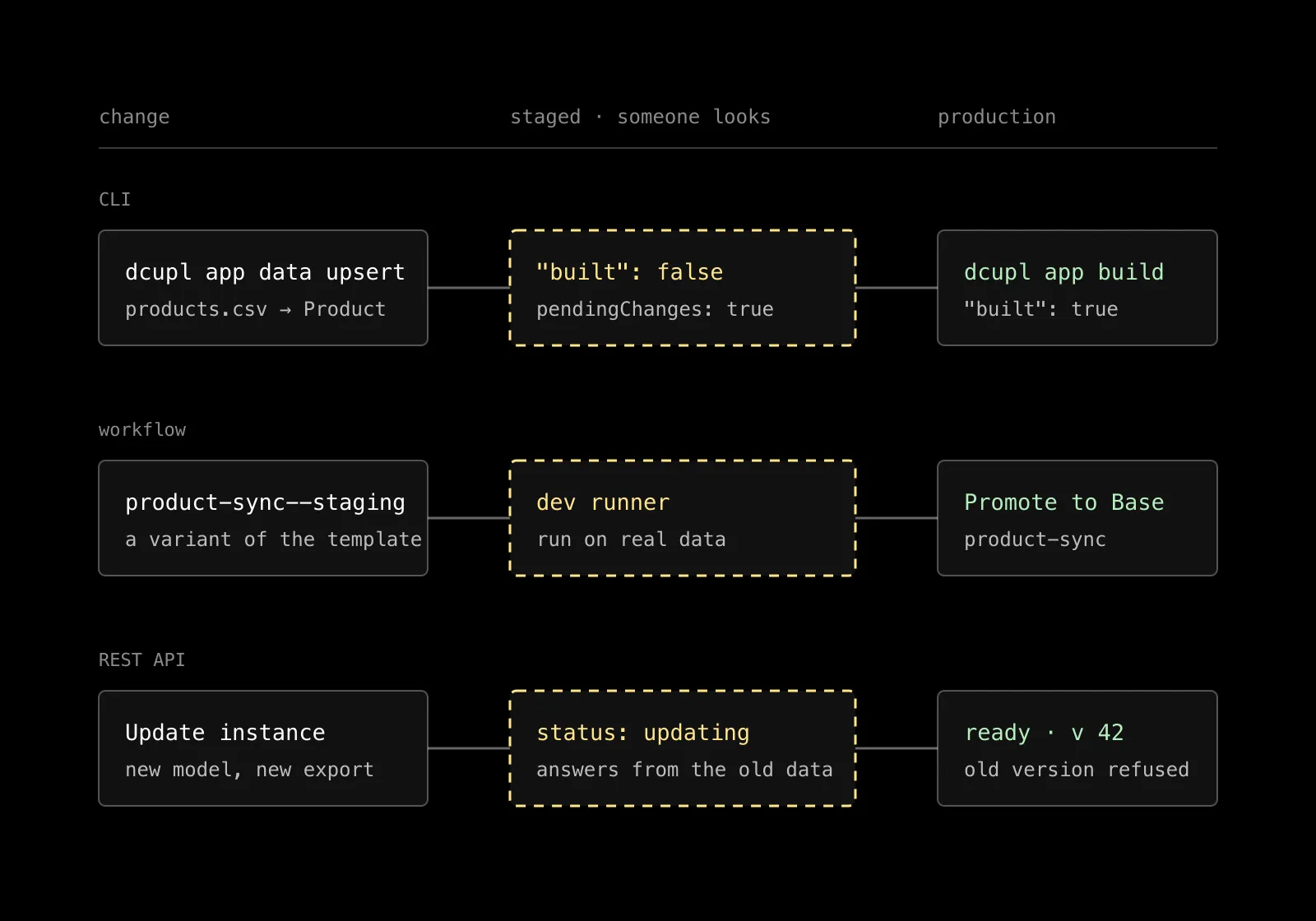
In dcupl, a change to data is never applied the moment it is made. It is staged, it is visible as staged, and it reaches production through a separate action that a person takes or approves. That is the whole rule. The three places where data changes each implement it in their own way.
In the CLI: built false
When an agent upserts a file into a model with the CLI, the answer says "built": false. The status command reports pending changes. The data in the running app has not changed. The agent, or you, runs dcupl app build to apply the staged changes, and the answer says what was built.
The agent can also be started in a mode that applies changes immediately. That is a flag you set, for a throwaway app on your own machine, not a default. On a project that matters, the stage is there, and the build is yours.
In workflows: a variant on a dev runner
A workflow that imports products every night is production. Changing it is a risk. So a workflow key with a suffix creates a variant of the base template. You change the variant, deploy it to a dev runner, run it against real data and look at the output. When it is right, you promote it to base. The deployed base keeps running the old version until you deploy it again.
Reporting closes the loop after the fact. A rule watches the deployed workflows and calls a reporting workflow when a run fails or recovers. A digest summarizes the week. Only metadata leaves the runner, never the items.
In the REST API: the old data until the update is done
A deployed REST API instance loads its data once, when it starts. A changed model, a new export or a changed template reaches the instance only when you update it. During the update, the instance answers from the previous data. When the version guard is on, the version changes with the update, and every cached response of the old version is refused.
For an agent connected over the MCP endpoint, where it is turned on, the same holds: it reads what is deployed, read-only, and cannot write through that door at all.
Why this matters more now
With a human at the keyboard, the step in between was a convenience. With an agent, it is the control. An agent is fast, tireless and confident, and it reports success on an empty result. The staged state is where that confidence meets a fact: these records would change, this mapping would drop this field, this workflow would call this endpoint. You see it before it is true.
It also makes the agent better. Because the lifecycle is explicit, the agent can see that changes are pending, reason about what is about to happen and recover cleanly when something looks wrong. A tool that applies changes silently gives it nothing to reason about.
What this is not
It is not a review board. The person who approves the build is usually the developer who asked the agent for it, a minute later, from the same terminal. The step is small. What matters is that it exists, that it is the same everywhere, and that it is the default rather than something you remember to turn on.
Where to read more
The stage and build lifecycle is described in the agentic docs. Variants and promotion are in the workflows docs, updates and the version guard in the REST API docs.
Let the agent make the change. Keep the step where you look at it.