For developers
Build a product catalog with dcupl: from CSV exports to a filterable catalog page

Gernot Bernkopf
CEO and Co-Founder, dcupl
Bergwind Cycles has its catalog as CSV exports: products, variants and categories. This is how those files become a catalog page with a category tree, facets with counts, a price filter and a detail view with colors and stock, built with the dcupl SDK. Bergwind is a fictional bike brand we made for demos; its data and images are generated.
product catalog SDK facets data model tutorial
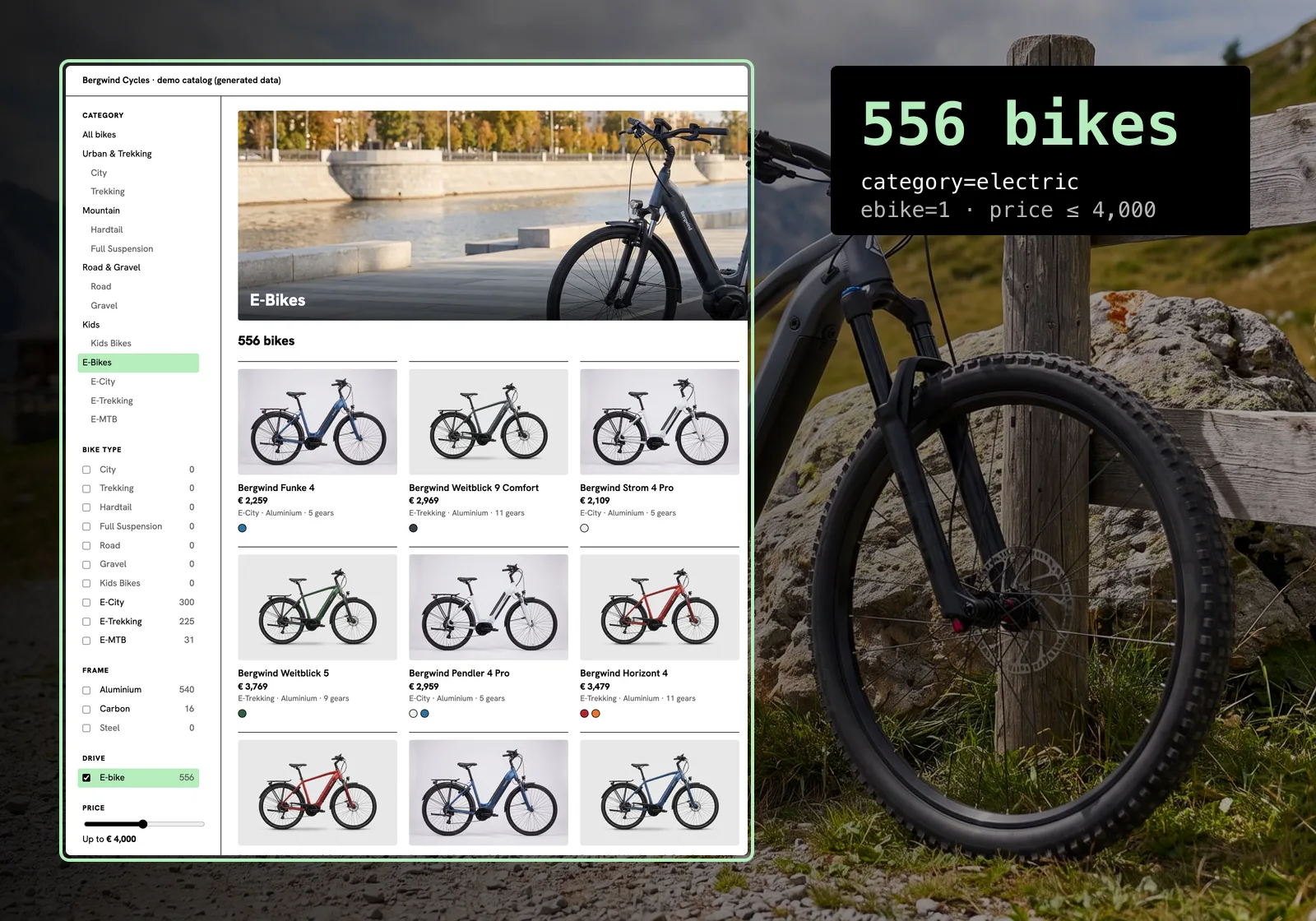
Bergwind Cycles sells bikes. It is a fictional brand that we built for demos, with generated data and generated images, but its starting point is the one most product catalogs share: the data already exists, as exports from the system where products are maintained. The catalog is three CSV files. One holds 3,000 bikes, one holds 16,766 variants (every color and frame size a bike comes in, with its stock), and one holds 15 categories in two levels.
What Bergwind wants is a catalog page. A customer picks a category, narrows it down by bike type, frame material, e-bike or not and price, and sees at every step how many bikes are left and how many each option would leave. A click on a bike opens its colors, its frame sizes and what is in stock.
What dcupl does
dcupl turns those files into a data model: products, variants and categories, the type of every column, and how the files point at each other. The dcupl SDK loads the model and the data into the browser and answers every filter, count and price range there. The page in this article has no backend of its own and no search server. It is a small web page that reads the catalog from a dcupl project and renders what the SDK answers.
Who does what
The business side owns the files. New exports go to the project's draft version in the dcupl Console and are checked there. When they are right, draft is copied to the version the page loads, and the new rows reach the page on its next load, without a code change. The model describes the columns and how the files connect, so the code of the page holds none of that.
The frontend owns the page. It asks the SDK for products, facets and ranges and decides how they look. Nothing in its code knows how many bikes there are or which categories exist; it reads that from the data.
This is the page, unfiltered, with all 3,000 bikes:
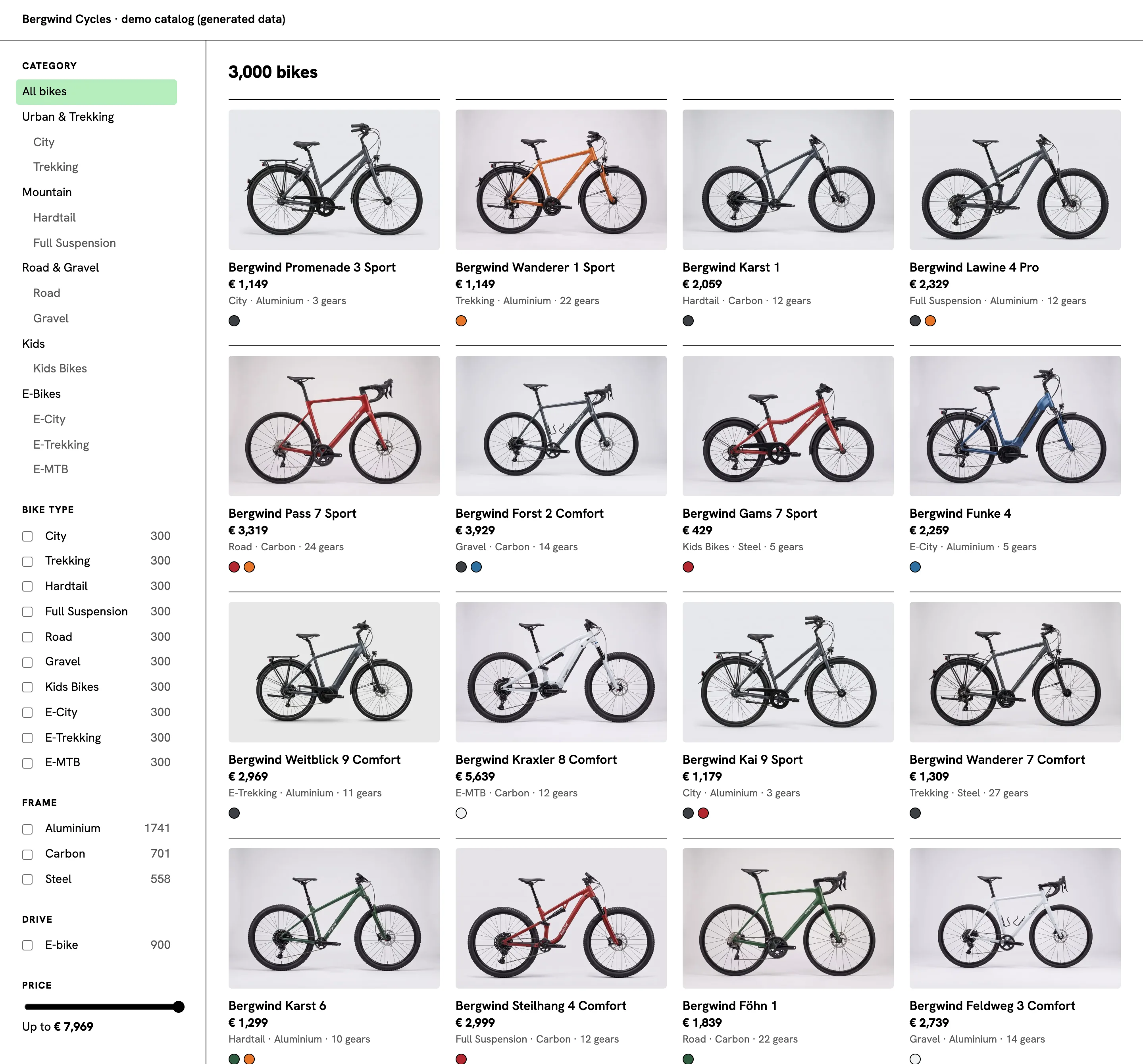
The rest of the article is for the developer who builds it. Every code excerpt below is taken from the project and the page in the screenshots. The page is a few TypeScript files, no framework, so it reads the same whatever frontend you use.
The data: three CSV exports
The products file has one row per bike. Here is its header and one row, from dcupl/data/products.csv:
key,slug,name,categoryKey,bikeType,frameMaterial,wheelSizeInch,gears,weightKg,priceEur,isEbike,batteryWh,motorBrand,year,description,image
BW-10028,bergwind-funke-2-pro-bw-10028,Bergwind Funke 2 Pro,e-city,E-City,Aluminium,28,6,23.7,2279,true,625,Kettenstrom,2026,The Bergwind Funke 2 Pro is an aluminium e-city bike with 6 gears and 28-inch wheels. Its Kettenstrom drive is powered by a 625 Wh battery.,https://a.storyblok.com/f/262961/1280x853/3bf2d5c4fa/e-city-graphite.jpg
categoryKey points at a row of the categories file, and the last column is the URL of the photo. The variants file, dcupl/data/variants.csv, has one row per color and frame size, with its stock and its own photo:
key,productKey,color,frameSize,stock,image
BW-10028-GR-S,BW-10028,Graphite,S,13,https://a.storyblok.com/f/262961/1280x853/3bf2d5c4fa/e-city-graphite.jpg
BW-10028-LB-S,BW-10028,Lake Blue,S,14,https://a.storyblok.com/f/262961/1280x853/84e46cc8b9/e-city-lake-blue.jpg
The categories file, dcupl/data/categories.csv, builds the tree with a parentKey: a root category has none, a leaf names its root. Categories carry a photo too: the image column holds a scene for each category, in the same CMS as the bike photos.
key,slug,name,parentKey,level,image
electric,electric,E-Bikes,,1,https://a.storyblok.com/f/262961/1920x1080/ba92da846a/scene-e-city.jpg
e-city,e-city,E-City,electric,2,https://a.storyblok.com/f/262961/1920x1080/ba92da846a/scene-e-city.jpg
The files stay as the export writes them. There is no transformation step in between.
The model: types and references
A model describes one file: its key, its properties with their types, and its references to other models. This is the whole product model, dcupl/models/product.dcupl.json:
{
  "key": "Product",
  "keyProperty": "key",
  "meta": { "name": "Product", "description": "Bergwind Cycles bike model" },
  "references": [
    { "key": "categoryKey", "type": "singleValued", "model": "Category", "meta": { "name": "Category", "description": "Leaf category of the product" } }
  ],
  "properties": [
    { "key": "slug", "type": "string", "filter": true },
    { "key": "name", "type": "string" },
    { "key": "bikeType", "type": "string", "filter": true },
    { "key": "frameMaterial", "type": "string", "filter": true },
    { "key": "wheelSizeInch", "type": "float", "filter": true },
    { "key": "gears", "type": "int", "filter": true },
    { "key": "weightKg", "type": "float", "filter": true, "aggregate": true },
    { "key": "priceEur", "type": "int", "filter": true, "aggregate": true },
    { "key": "isEbike", "type": "boolean", "filter": true },
    { "key": "batteryWh", "type": "int", "filter": true },
    { "key": "motorBrand", "type": "string", "filter": true },
    { "key": "year", "type": "int", "filter": true },
    { "key": "description", "type": "string" },
    { "key": "image", "type": "string" }
  ]
}
Two things in it carry the page. The reference categoryKey turns the column into a link to a Category, so a query can follow it: categoryKey.parentKey is the root category of a product. And the types: priceEur is an int, so the price cap compares numbers with lte, and the page can ask for the lowest and highest price, which is what the price slider runs on. Queries and facets work on every property. filter: true lists a property in catalog.filters, the SDK's ready-made items for a filter UI; this page builds its own sidebar and does not use them, and aggregate: true has no effect on queries or aggregates. The variant model works the same way, with productKey as its reference to Product.
The loader and the catalog application
The loader configuration lists the files of the project and groups them into applications. This is dcupl/dcupl.lc.json:
{
  "applications": [
    { "key": "default", "name": "All data", "description": "Catalogue and dealers" },
    { "key": "catalog", "name": "Catalogue", "description": "Categories, products and variants", "resourceTags": ["catalog"] },
    { "key": "dealers", "name": "Dealers", "description": "Dealer locator data", "resourceTags": ["dealers"] }
  ],
  "resources": [
    { "type": "model", "url": "${baseUrl}/models/category.dcupl.json", "tags": ["catalog"] },
    { "type": "model", "url": "${baseUrl}/models/product.dcupl.json", "tags": ["catalog"] },
    { "type": "model", "url": "${baseUrl}/models/variant.dcupl.json", "tags": ["catalog"] },
    { "type": "model", "url": "${baseUrl}/models/dealer.dcupl.json", "tags": ["dealers"] },
    { "type": "data", "model": "Category", "url": "${baseUrl}/data/categories.csv", "tags": ["catalog"] },
    { "type": "data", "model": "Product", "url": "${baseUrl}/data/products.csv", "tags": ["catalog"] },
    { "type": "data", "model": "Variant", "url": "${baseUrl}/data/variants.csv", "tags": ["catalog"] },
    { "type": "data", "model": "Dealer", "url": "${baseUrl}/data/dealers.csv", "tags": ["dealers"] }
  ]
}
The project also holds a dealer list for a dealer locator. The application catalog picks the resources tagged catalog: the three models and their three files. The catalog page loads only that slice, so this page never downloads the dealers.
Loading the catalog in the browser
The page needs the project id and a key. It uses the Browser (read-only) key of the project, which can read and nothing else. Both go into a local env file that is not committed; the example file, .env.example, shows the names:
VITE_DCUPL_PROJECT_ID=your-project-id
VITE_DCUPL_API_KEY=your-browser-key
Loading is one function, src/dcupl.ts:
import { Dcupl } from '@dcupl/core';
import { DcuplAppLoader } from '@dcupl/loader';

export async function loadCatalog(): Promise<Dcupl> {
  const dcupl = new Dcupl({
    config: {
      projectId: import.meta.env.VITE_DCUPL_PROJECT_ID,
      apiKey: import.meta.env.VITE_DCUPL_API_KEY, // the Browser (read-only) key
      version: 'catalog-demo',
    },
  });

  const loader = new DcuplAppLoader();
  dcupl.loaders.add(loader);

  await loader.config.fetch(); // dcupl.lc.json of the version
  await loader.process({ applicationKey: 'catalog' }); // models and data
  await dcupl.init();
  return dcupl;
}
The page loads the version catalog-demo of the project: the version that draft is copied to once the new exports are right. Pin a version in the docs explains how versions work.
After init(), the page creates one list per model it queries. From src/main.ts:
const dcupl = await loadCatalog();
const products = dcupl.lists.create({ modelKey: 'Product' });
const variants = dcupl.lists.create({ modelKey: 'Variant' });
const categories = dcupl.lists.create({ modelKey: 'Category' }).catalog.query.items() as Category[];
const range = priceRange(products); // read once, before any filter
The category tree in the sidebar is the Category list as it is: the roots are the rows without a parentKey, and each root is followed by its leaves.
Categories, facets and filters
The filters live in one file, src/filters.ts. A filter state is what the sidebar shows: a category, the checked bike types and frame materials, the e-bike switch and the price cap. applyFilters turns it into the query of the product list:
export function applyFilters(list: DcuplList, state: FilterState): void {
  const { query } = list.catalog;
  query.clear();

  // Groups on different attributes are ANDed; the values inside a group are ORed.
  const anyOf = (attribute: string, values: (string | boolean)[]) =>
    query.addGroup({
      groupKey: attribute,
      groupType: 'or',
      queries: values.map((value) => ({ attribute, operator: 'eq', value })),
    });

  if (state.categoryKey) {
    // a leaf category, or a root category through the leaves that point to it
    query.addGroup({
      groupKey: 'category',
      groupType: 'or',
      queries: [
        { attribute: 'categoryKey', operator: 'eq', value: state.categoryKey },
        { attribute: 'categoryKey.parentKey', operator: 'eq', value: state.categoryKey },
      ],
    });
  }
  if (state.bikeType.length) anyOf('bikeType', state.bikeType);
  if (state.frameMaterial.length) anyOf('frameMaterial', state.frameMaterial);
  if (state.isEbike !== undefined) anyOf('isEbike', [state.isEbike]);
  if (state.priceMax !== undefined) {
    query.addCondition({ attribute: 'priceEur', operator: 'lte', value: state.priceMax });
  }
}
The category group is where the reference pays off. A product belongs to a leaf category. When the customer picks a root such as E-Bikes, the query matches every product whose category is that root's leaf, by following categoryKey to the category's parentKey. One query covers both levels, and the page needs no list of which leaves belong to which root.
The counts next to each option come from facets, the price slider from an aggregate. The rest of src/filters.ts:
// Counts follow the current query; a facet's own group is left out, so its siblings stay selectable.
export function facetsFor(list: DcuplList) {
  const facets = (attribute: string) => list.catalog.fn.facets({ attribute, excludeZeros: false });
  return {
    bikeType: facets('bikeType'),
    frameMaterial: facets('frameMaterial'),
    isEbike: facets('isEbike'),
  };
}

export function priceRange(list: DcuplList): { min: number; max: number } {
  const { min, max } = list.catalog.fn.aggregate({ attribute: 'priceEur', types: ['min', 'max'] });
  return { min: min ?? 0, max: max ?? 0 };
}
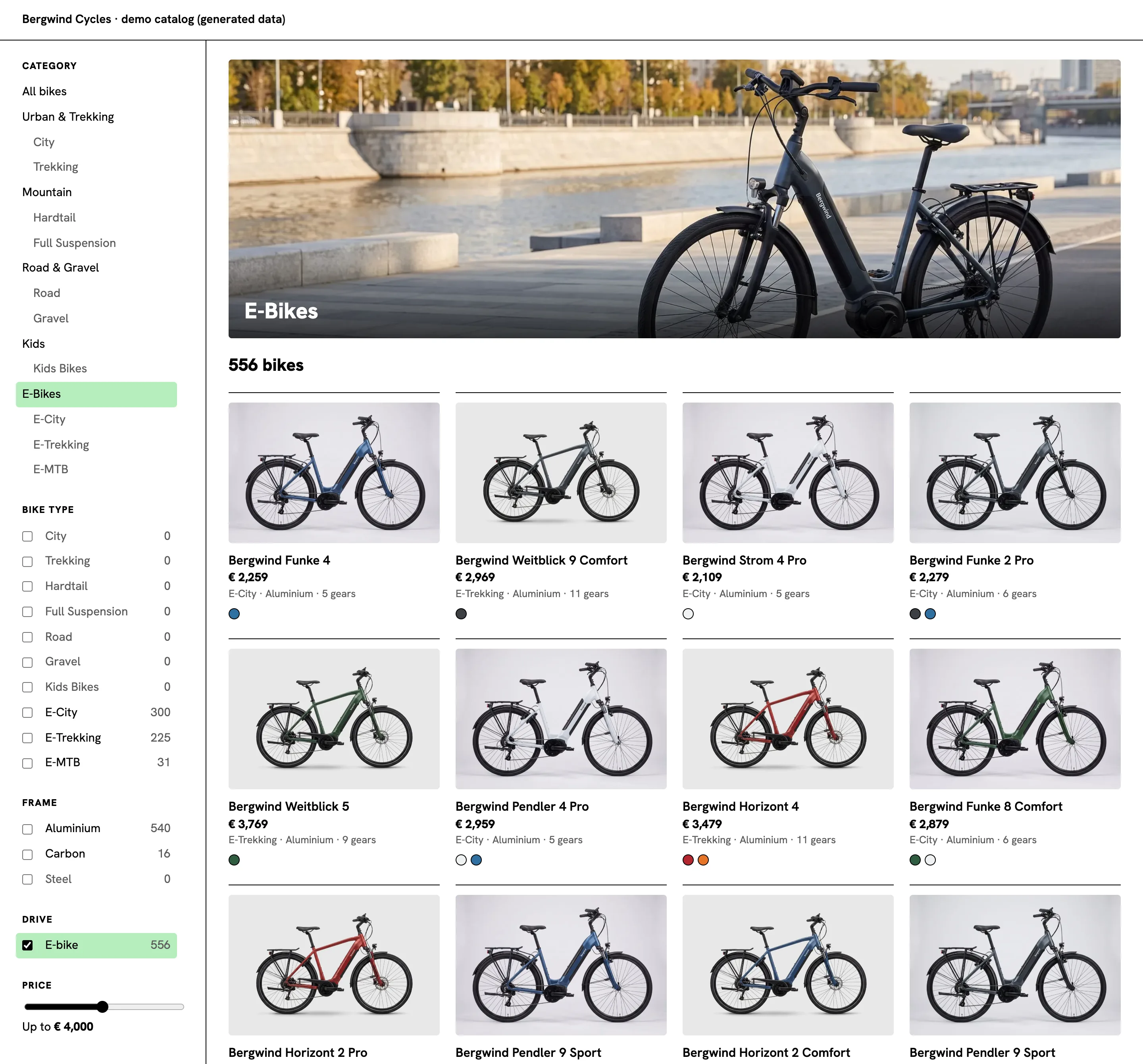
A facet counts against the current query, so the numbers change with every click. Because each group carries the attribute as its groupKey, a facet leaves its own group out: with Gravel checked, Road still shows how many bikes checking it would add, instead of zero. excludeZeros: false keeps the options that have no hits in the list, so the sidebar does not jump around; they show 0. The price range is read once, before any filter, so the slider always spans the whole catalog, from 199 to 7,969 euros.
The page keeps the filter state in the URL, so every view can be linked and loaded again. Here is ?category=electric&ebike=1&price=4000: the E-Bikes category, the e-bike switch and a price cap of 4,000 euros. Of the 900 e-bikes, 556 cost 4,000 euros or less:
Images from a headless CMS
dcupl does not store the images. The data holds the URL of each photo, and the photos live where images are managed anyway: in a CMS or a DAM. Bergwind's photos are in Storyblok, a headless CMS, so the image column of the CSV files holds each photo's asset URL there. MEHLER Elektrotechnik's product catalog also combines a headless CMS and dcupl.
Because the CMS resizes images on the fly, the page does not need a set of files per width. It builds the srcset from the one URL in the data, in src/images.ts:
// Storyblok resizes and converts on the fly: append /m/<width>x0/filters:format(webp) to the asset URL.
export function srcset(url: string, widths = [480, 960, 1440]): string {
  return widths.map((w) => `${url}/m/${w}x0/filters:format(webp) ${w}w`).join(', ');
}
There is no image base URL in the code and no lookup table: what the data says is what the browser loads.
The category scenes work the same way. When a category is selected, the page shows its scene as a banner above the count; a root category uses the scene of one of its leaves, and All bikes shows none. From src/render.ts:
/** The scene of the selected category above the hits; "All bikes" has none. */
export function bannerHtml(categories: Category[], categoryKey: string | undefined): string {
  const category = categories.find((c) => c.key === categoryKey);
  if (!category) return '';
  return `<figure class="banner">
    <img src="${category.image}/m/1440x0/filters:format(webp)" srcset="${srcset(category.image, [960, 1440, 1920])}" sizes="${BANNER_SIZES}" alt="${category.name}" width="1440" height="450">
    <figcaption aria-hidden="true">${category.name}</figcaption>
  </figure>`;
}
The banner uses the same srcset helper, with wider steps.
One detail of the generated data shapes the cards. The product's own image column always shows the bike in graphite, but many bikes do not come in graphite at all. So the card takes the photo of the first color the bike comes in, from its variants. From src/render.ts:
// The photo shows the first colour the product comes in
const photoOf = (p: Product, colours: Colour[]) => colours[0]?.image ?? p.image;
The detail view with variants
A click on a card opens the bike with its variants. The variants come from the second list, filtered by the product key, in src/variants.ts:
export function variantsFor(list: DcuplList, productKey: string): Variant[] {
  const { query } = list.catalog;
  query.clear();
  query.addCondition({ attribute: 'productKey', operator: 'eq', value: productKey });
  return query.items() as Variant[];
}

// One entry per colour, in the order of the palette above, with the image of that colour
export function coloursOf(variants: Variant[]): Colour[] {
  const byName = new Map(variants.map((v) => [v.color, v.image]));
  return Object.entries(HEX)
    .filter(([name]) => byName.has(name))
    .map(([name, hex]) => ({ name, hex, image: byName.get(name)! }));
}
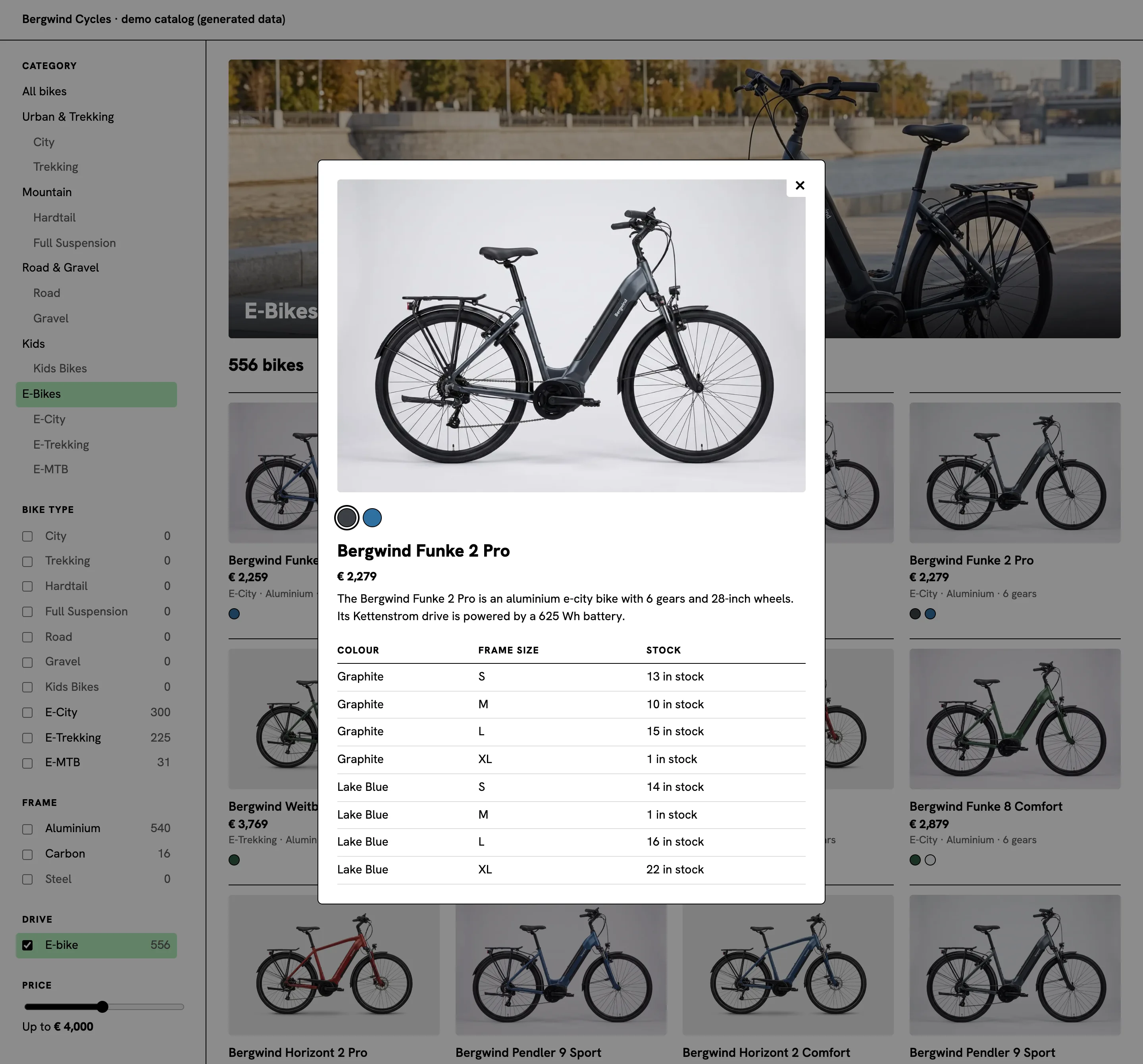
variantsFor gives the rows of the table: color, frame size and stock. coloursOf folds them into one swatch per color (HEX, above it in the file, maps each color name to its swatch), each with the photo of that color, so a click on a swatch switches the photo. The cards show the same swatches.
The Bergwind Funke 2 Pro, an E-City bike at 2,279 euros, comes in Graphite and Lake Blue, in eight variants with 92 bikes in stock. Its dialog is one URL away: the filtered view plus &product=BW-10028.
Where to go next
What you built: three CSV exports, three models that type the columns and connect the files, a loader configuration with a catalog application, and a page that loads that application in the browser and answers categories, facets, a price range and variants with a handful of SDK calls. No backend, no search index to run, and new rows reach the page when draft is copied to its version, without a code change.
The browser loads the catalog before it shows the first bike. When the first page must be in the HTML, for search engines or for the first view on a slow phone, a REST API (RAPI) instance answers the same queries from the same models over HTTP. Render the first page on the server from the REST API and let the SDK take over in the browser. The REST API docs have the details.
To build your own: the SDK quick start sets up a project, loading from the Console covers versions, applications and keys, and facets documents the counts the sidebar shows.
Your catalog is already in your exports. Describe it once in a model, and the page can filter it.